01 / Time
Clock in, pause and finish
Record the start and end of a shift, pause for breaks, and edit or remove an entry when a correction is needed.
Smarter shift tracking / iOS + Android
Track work hours, pauses, overtime, deductions and take-home-pay estimates in one polished app built around the schedules people actually work.
Available on iOS + Android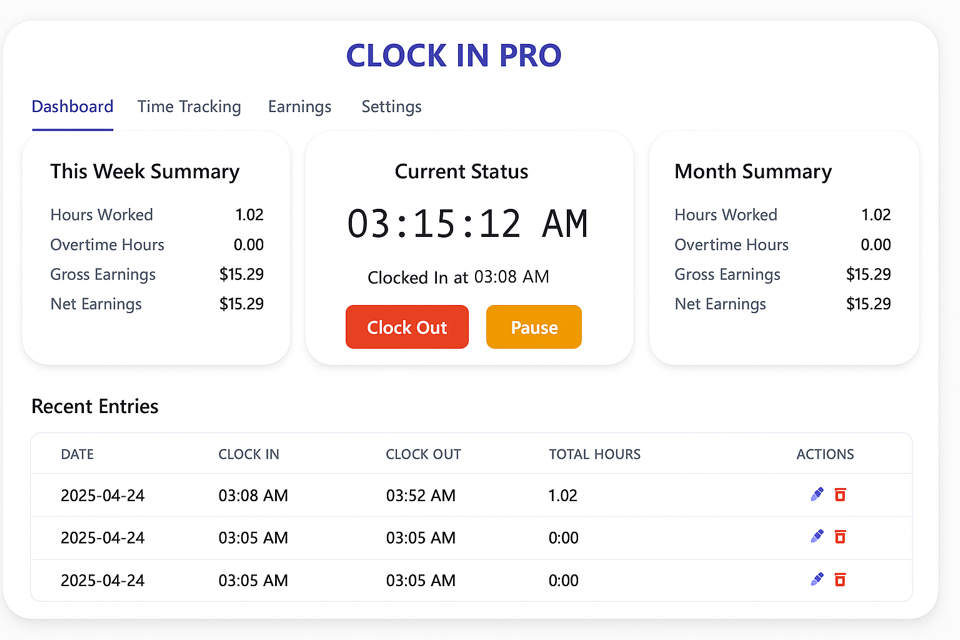
Work records without the spreadsheet
Clock In Pro combines day-to-day time capture with the overtime, deductions and summaries that basic timer apps often leave out.
01 / Time
Record the start and end of a shift, pause for breaks, and edit or remove an entry when a correction is needed.
02 / Overtime
Configure overtime settings and review regular and overtime hours across weekly and monthly summaries.
03 / Earnings
Add pay details, taxes and custom deductions to produce a clearer take-home-pay estimate.
04 / Profiles
Create distinct work profiles, switch between jobs and keep their records and summaries apart.
05 / Reports
Use charts to compare work patterns, then export reports for personal records, payroll review or invoicing.
06 / Access
Switch the interface language and use the core time-tracking workflow without an account or mandatory cloud sync.
Designed for changing schedules
Useful for shift workers, healthcare and hospitality staff, drivers, consultants, students, interns and anyone balancing more than one job.
Set work, pay, overtime, deduction, language and currency preferences for the profile.
Clock in, pause when needed and clock out, with the option to correct entries afterward.
Check regular hours, overtime and estimated earnings, then export a report when you need a portable record.
Related work
Turn a long address list into a clearer multi-stop route before the working day gets busy.
Explore Stoptimizer ↗Track meals, calories and macros with photo estimates, barcode lookup and optional health sync.
Explore Calorie Log ↗